- LMM0801

- Tweet




- Diagnostic
- Clinical Review
- Digital Mammography
- Surgical
- Quality Control
- Features
- Specifications
- Documents
- Graphics Boards
- QC Software & Tools Accessories
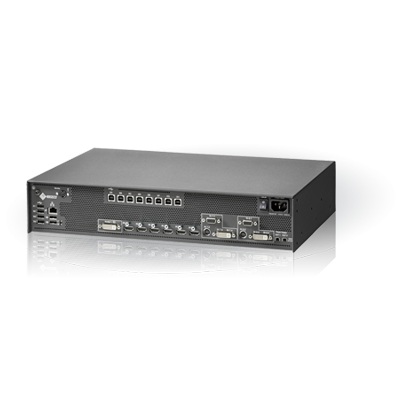
All Gather In One
The Large Monitor Manager bundles up different signal sources and enables you control them from one location.
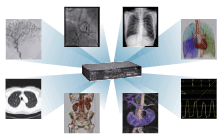
One Monitor, Keyboard and Mouse
Working with the Large Monitor Manager, the operator can focus on a single monitor, keyboard and mouse instead of juggling with multiple systems. This speeds up workflow and reduces the potential for handling errors.
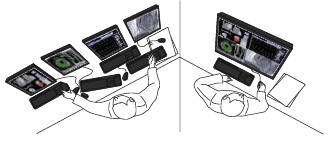
Local and Remote Control
Layout edition or layout change, either can be done with local keyboard & mouse or remotely by browser interface. Simple user interface for layout change by using CID1000P.
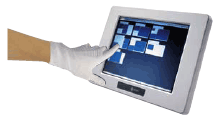
Saving time by Optimizing Workflow
Individual image placement and window size preferences can be easily arranged and recalled using the Large Monitor Manager.
Small and Compact Size
The small size allow flexible integration in existing systems, it can easily be mounted on a ceiling suspension, into a rack or into a wall console.

Common Interface
This network interface allows customer applications automated control of Large Monitor Managers. Layout changes and status information e.g. can directly be done from x-ray system.
Short Start-Up Time
The video signal is available at the output within 4 seconds. This guarantees immediate readiness, even after a power failure.

| Model Variations |
LMM0801-L: WQXGA output
LMM0801-WQHD: WQHD output LMM0801-FHD: FHD output |
|---|---|
| Cabinet Color | Anthracite Gray |
| Interface Specifications | |
| Input Terminals |
Digital: HDMI connectors (DVI signals only) x 6
Digital / Analog: DVI-I x 2 Analog: D-Sub mini 15 pin x 2, mini DIN x 2 8 simultaneous visible inputs |
| Input Performance |
Digital: DVI-D (single link), 1920 x 1200 maximum, 60 Hz or 2048 x 1536, 30 Hz (165 MHz pixelclock maximum, horizontal size 2048 maximum)
Analog: DVI-I, VGA, S-Video (PAL/NTSC), 1920 x 1200 maximum, 60 Hz (170 MHz pixelclock maximum, horizontal size 1920 maximum), SoG |
| Output Terminals | DVI-D (Dual Link) x 1 |
| Output Performance |
LMM0801-L: 2560 x 1600 (WQXGA),
LMM0801-WQHD: 2560 x 1440 (WQHD), LMM0801-FHD: 1920 x 1080 (FHD) |
| Communication Connector | Ethernet (RJ45) |
| USB Ports |
USB downstream (for e.g. keyboard, mouse, joystick) x 6
USB upstream (for control of video applications on PCs) x 8 |
| Power | |
| Power Requirements | AC 100 - 120 V, 200 - 240 V: 50 / 60 Hz |
| Power Consumption | 65 W |
| Physical Specifications | |
| Degree of Protection | IP20 |
| Net Weight | 5.3 kg |
| Mechanical Adaption | 19" rack design, 2 U high |
| Features & Functions | |
| OSD Languages | English, German, French, Japanese |
| Controls and Status | Graphical user interface and software control interface for operating, status and diagnosis, LED indicators for hardware status x 2, support of CID1000P |
| Certifications & Standards (Please contact the EIZO subsidiary or distributor in your country for the latest information.) | IEC/EN60601-1 (3rd edition), IEC/EN60601-1 (2nd edition), CAN/CSA C22.2 No. 601-1 M90, CAN/CSA No. 60601-1-08, UL60601-1, EN55022-Class-B, C-tick, RoHS, China RoHS, WEEE, CCC |
| Supplied Accessories | AC power cord (us, eu, cn, jp), adapter cables (HDMI ~ DVI) x 6, mounting brackets, screws x 4, Utility Disk (user's manual, service manual, test patterns) |
| Warranty | Two Years |
| Dimension Drawing | JPG |
Brochures
 |
|

|
|
LMM0801
|
Manuals
Please note that you must be a registered user to download RadiForce relevant files. If you have not registered, please continue on to our registration page. If you have forgotten your User ID or Password, please send us an e-mail.
| Document | Language | Size | Download |
|---|---|---|---|
| LMM0801 User's manual (English) | English | 2.53 MB |  |
| LMM0801 User's manual (German) | German | 2.17 MB | |

- Cable & TDL Holder


